Reviewing main program sections, standard
tools and buttons
Sections
Toolbars: System menu
Toolbars: Goto toolbar
Toolbars: Controls toolbar
1. Sections
|
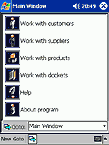
Fig.2. Program sections
|
The program has six main sections.
Work with customers giving you access to your customer database and all related
operations.
Work with suppliers is similar, but it is granting access to supplier records.
Work with products allows you to control product records and details.
Work with dockets is for document database and many related operations.
Help section contains this document.
About program section contains program release info and developer details.
back to top
2. Toolbars and buttons
System menu

New option allows creating a new record of any type - Customer, Supplier,
Product or Docket (analogue of
 button). button).
Goto is quick navigation button (analogue of Goto toolbar).
Next option is depending on the section where you are now and may be alternatively Customer or
Supplier or Product or Docket. It gives you the access to all operations
available for this record type - View, Edit, New blank, New based on
selected, Delete, etc. (analogue of Controls toolbar).
 button invokes filtering procedure
for large lists of records (check FINDING THE NECESSARY ENTRY IN DATABASE
chapter for details). button invokes filtering procedure
for large lists of records (check FINDING THE NECESSARY ENTRY IN DATABASE
chapter for details).
 button switches Goto toolbar on/off. button switches Goto toolbar on/off.
 button switches Controls toolbar
on/off. button switches Controls toolbar
on/off.
back to top
Goto toolbar

Quick navigation toolbar granting you access to all main program sections, main window, opened
documents and exit (logout) function. Just select the target section from dropdown list.
back to top
Controls toolbar

It has different set of buttons in each program section - depending on operations available
in current window.
View button  allows previewing
the details of selected entry. allows previewing
the details of selected entry.
Edit button  allows editing them. allows editing them.
New button allows creating
new entry of the type allowed for this section.
New based on selected button  exists only in Dockets section and allows creating new document based on details taken from
existing one (i.e. such non-unique details as Customer/Supplier name, list of products, etc. will
be automatically filled so you only need to fill docket-unique values)
exists only in Dockets section and allows creating new document based on details taken from
existing one (i.e. such non-unique details as Customer/Supplier name, list of products, etc. will
be automatically filled so you only need to fill docket-unique values)
Delete button  simply
deletes the selected entry. simply
deletes the selected entry.
Preview button  provides
print preview of the document to be printed. provides
print preview of the document to be printed.
Print button  will print
the current document. will print
the current document.
Received/dispatched stock (in Dockets section) or Change Stock (in
Products section) button  is a stock control tool allowing you to adjust the quantity of goods in your stock. In other
sections this button does not exist.
is a stock control tool allowing you to adjust the quantity of goods in your stock. In other
sections this button does not exist.
New purchase order for product button
 generates new purchase order
for selected products transferring the product's details and related supplier info into docket.
The button exists in Products section only. generates new purchase order
for selected products transferring the product's details and related supplier info into docket.
The button exists in Products section only.
New docket for customer/ supplier/ product button
 exists in Customers,
Suppliers and Products sections and allows creating any of available docket types
transferring the entry's details and related info into corresponding fields. exists in Customers,
Suppliers and Products sections and allows creating any of available docket types
transferring the entry's details and related info into corresponding fields.
History button  exists in Customers and Suppliers sections and allows accessing filtered list of
all documents related to selected customer/supplier only.
exists in Customers and Suppliers sections and allows accessing filtered list of
all documents related to selected customer/supplier only.
back to top
|
